
A recipe for Business Owners
Recipe v3.3.2 · updated 14 November 2026 · see the digital-team repository release v3.3.2.
LATER EDIT (November 2026). A note on plans: the figures in this article reflect the Claude plan I used at the time of writing. For a business, I recommend Anthropic’s Team plan, the one made for companies: among other things, your content is not used to train models by default. A Team plan starts at two seats, so the bill may be higher, but the difference against a human team stays the same order of magnitude. Plans and prices: https://claude.com/pricing. Run the numbers for your own business; you may amaze yourself.
This Digital Team Recipe for Business Owners is an ongoing attempt to replace a real human team with AI “colleagues”, in a business environment. Although novel, this is not an experiment, it’s a real professional blueprint exercised daily in a real Company.
Our Digital Team is composed of AI sessions, similar to Departments in a real company. Each AI session is long-lived, i.e. it’s not, in principle, limited to a certain timeframe, or knowledge – given some protocol is followed. Each AI session is owning one Department of the business, working together under one human Operator. To shed some clarity, in the context of current industry experiments, The Digital Team as described here, is NOT a swarm of short-lived workers: its sessions strive (and in my opinion awesomely succeed) to reproduce real human activity. That is, “soft” human activity, white collar work.
What they can do:
- they are “colleagues” with memory
- they act under a Team Rules Corpus, a written agreement between them
- they are monitored: as a safety measure, a Guard reads every command the sessions run; it follows fixed rules, and no one can argue it out of them
- they are led by you as the responsible human (Owner)
This page is the recipe for this Digital Team.
Below is a SWOT for the owner, then the structure, the Master Rule everything depends on, what the sessions decide on their own, a day in a session’s life and how to start, and finally a FAQ.
The story of how it came about is in the posts listed at the end.
A SWOT from the Owner’s PoV
As Business Owners, we more or less intuitively decide everyday with a SWOT framing. You use formal or informal SWOTs before every hire and every new tool, whether or not you call it a SWOT. As you may know, every SWOT must be anchored to a Point of View, or cognitive reference. This SWOT is anchored to the Business Owner itself.
Strengths
- It doesn’t forget. Every department ledgers what it did and what comes next, and everything is in dated history. Most humans forget easily.
- Security runs daily, not when someone remembers. In our setup, a critical WordPress flaw went from relayed to twelve sites patched in about twenty minutes. Speed and consistency, especially in programming, are essential, but this applies to any IT managed resource, regardless of the specifics of a business.
- A Guard reads every command before it runs, and every decision leaves a paper trail: who, when, on what evidence. Every session can manage resources: files, computers, network shares, networked devices. Critical actions are stopped, asking you to approve them.
- Cheap: around 109 EUR a month, against over 8,000 for three junior colleagues (details in the FAQ at the end, or read an additional calculus in The Multiplier post.).
Weaknesses
- It needs an Operator. And cannot be otherwise. The business is run by a human Owner, who has to be present and managing the digital “colleagues”. The Owner also amplifies experience, and definitely cannot be replaced.
- Operator’s attention is the limit. A few hours of piloting a whole team is a full day’s attention. Planning with the lanes helps a lot.
- Today it lives in a terminal, on Linux or macOS. So, no mouse and drag-and-drop. Yet – Windows support is being tested.
Opportunities
- A small firm operating like a bigger one, with the functions of several Department heads run by one Human Operator.
- Services you could not staff before: among others, you can run daily security sweeps, same-day patching, weekly audits of your own records. Think about the stress of monthly payroll.
- Your procedures written down as a side effect, and that produces growth without hiring. This is real gold: procedures self improve without fuss.
Threats
- One vendor. Prices, limits and terms for the AI model vendor can change. Currently, this blueprint is built around Anthropic’s Claude Code harness and Claude AI models. That is incidental, and, in my opinion, the results are plainly awesome, at an irresistible cost. But that may change in the future, outside my control. Nevertheless, the rules, history and hooks stay yours, in plain files.
- Rubber-stamping. “Colleagues” will ask for your opinion a lot. Maybe less than a human equivalent, but still. Do treat this as a very good habit: once decided, the digital “colleague” will execute very complex tasks with light-speed. However, agreeing with good recommendations almost every time feels exactly like no longer reading them. In my experience, most of the recommendations from AI are truly the right ones, and sometimes even better than mine.
- The signature stays yours. In case of failure of any kind, you are the sole responsible. That’s it. Responsibility is not delegated.
The Team structure
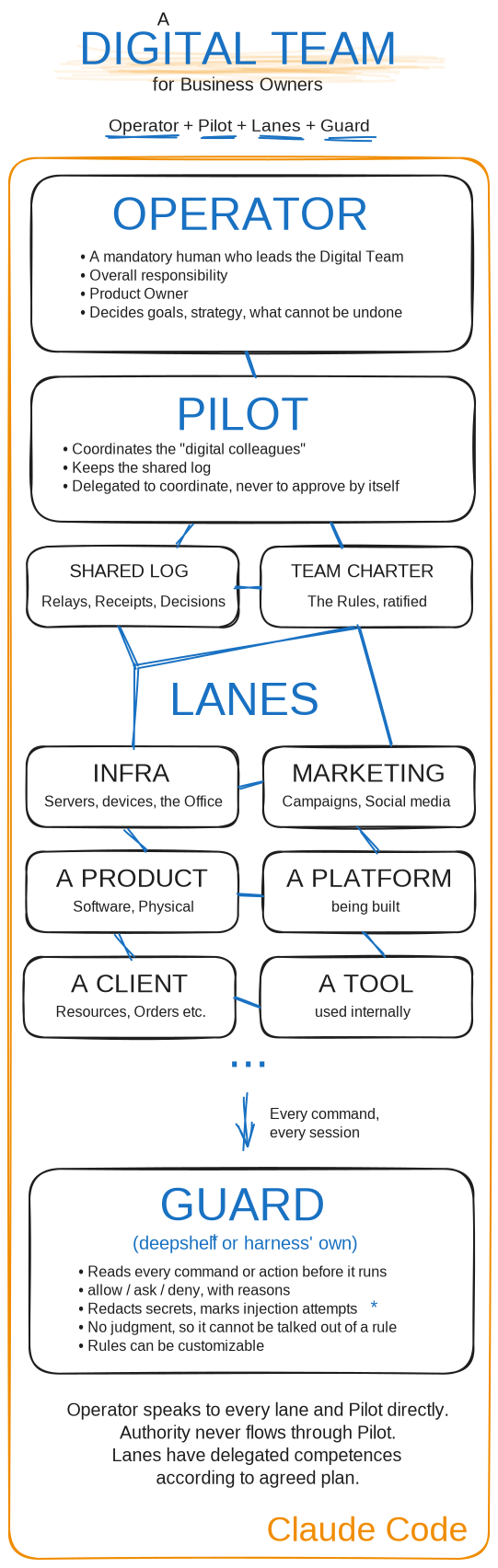
- The Human Operator is a person (the equivalent Team Leader): the only source of authorization, and the one who decides what cannot be undone.
- Lanes are the Departments of the business, each owned by one Claude session (the equivalent of a human responsible for that Department): it has its own folder, its own repository, own memory, Issue tracker and boundaries. For example, our lanes pack is typical for a multidisciplinary IT services company (but otherwise anything is possible in white collar work): one lane maintains a fleet of client websites and the servers they run on, another one supervises an office network, another develops and maintains a CRM, one runs a restaurant platform, and several handle WordPress plugins.
- The Pilot is a session, too. Besides its own product it develops, it also is the delegated Team coordinator: it runs the Team’s routines on the Operator’s behalf, but cannot approve anything for another lane. It keeps the shared log, relays findings between lanes and assembles the daily digest. Being both a product department and a Pilot is incidental, and it performs both tasks very well.
- The Team Charter is the Team’s written agreement, ratified rule by rule in each lane (the staff handbook every company has; and nobody reads). The most visible benefit I see is that critical, unrecoverable mistakes are basically gone.
- The Guard sits under every session and reads every command before it runs (a security guard at the door IRL). Ours is deepshell.
In corporate slang
| In a company | Title | In our Digital Team |
|---|---|---|
| Management (the one who signs off) | CEO, Owner | The Operator |
| The staff handbook (internal regulations and organization rules) | P&P: Policies and SOPs | The Charter (the policies); each lane’s procedures are its SOPs |
| Departments | CTO, CMO, CFO etc. as Department Heads | The lanes |
| The Blue Team (monitoring, response, patching) | SOC (security operations centre) | The lanes’ daily security sweeps, a decision for every finding, relays through the Pilot |
| The Chief Operating Officer (running operations but not signing for the departments) | COO (without the signature) | The Pilot: decides its own remit, runs the team’s routines, never approves for another lane |
| The firewall and endpoint protection (the security guard at the door) | EDR | The Guard (deepshell) |
Who decides – the Master Rule
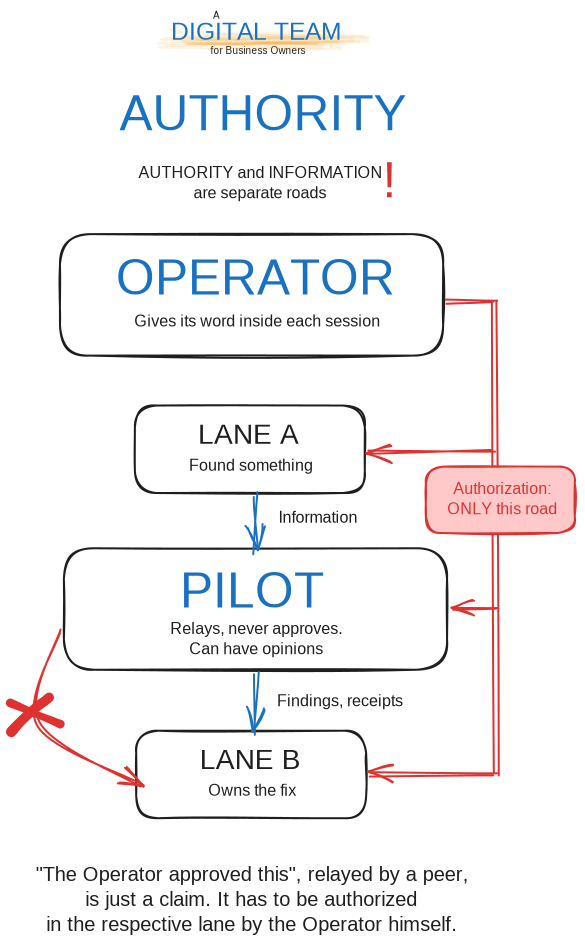
Lanes talk to each other. This is the moat of our Digital Team. They tell each other things – findings, receipts, “fixed, here is the commit”. They often “quarrel”, but in the most elegant way. Much like English etiquette. They never approve anything for each other. The Operator’s word counts only when it is given inside the session that will act on it, so a relayed “the Operator approved this” is only a claim, and the lane that hears it asks in its own window. Everything else on this page depends on that Master Rule.
What the sessions decide
Most of it. Inside its lane a session decides what to build and how, what to test, what a finding means and what happens to it, and it does so without asking. That is, after any clarification is first asked to you, the Operator. Think about it: how often your human colleagues ask for competent clarifications for a better outcome?
Between lanes, sessions review and correct each other – including the Pilot. What reaches the Operator is a short list: acts that cannot be taken back or that leave the lane, like a reboot, a patch across client sites or removing a service. Each arrives in a structured format, as a four-line ask with the lane’s recommendation, and usually the recommended action is the right one almost every time.
That is delegated judgement, not a tool waiting for instructions, and it is earned: in months of daily work there has been no serious mistake, and the last notable one – a DNS configuration wiped on a hosting panel (by an older model anyways) – was restored by the lane itself immediately from history. The Operator still reads every ask. Agreeing almost always is also exactly what a rubber stamp feels like, and the Operator’s read is an important, but different instrument from the sessions’ own. Read every one of them.
A Digital day
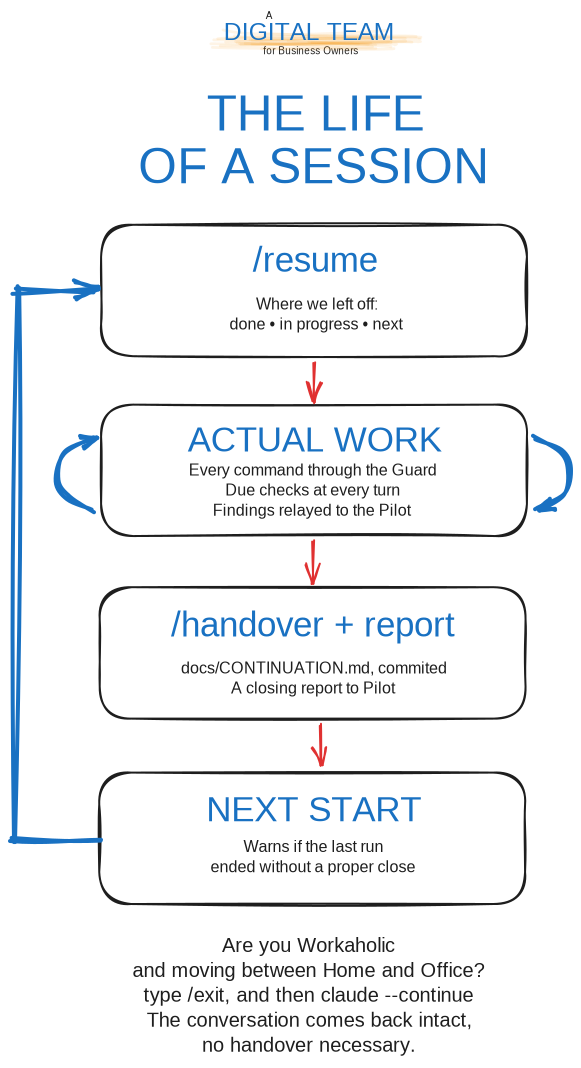
The journey is not much different from a coherent and organised human team. Except instead of talking, you interact in a chat:
- Start with the custom command
/resume: after runningclaudecommand in the lane’s folder, it starts loading all the previous work and gets ready to continue: where we left off – done, in progress, next. - Work. Then the lane presents you some logical work to do today. It diligently checks the backburner and the previous planning (from
ISSUES.md). Before it starts on an item, it checks the item is still open, because sometimes an earlier fix already solved it. When it closes one, it looks for what else the same fix solved and closes that too. Everything that waits for your decision comes as one numbered list, so you can answer “2: yes, 5: later” without reading an essay. You can input anytime your new tasks, emergencies, stop the current work, anything. If you need, just type wait and the lane will stop the work without losing anything; its daily security sweep and its housekeeping still run. Every task that needs a command passes the Guard. Small hooks say when a regular job is due, whether the last run ended without a proper close, whether another session is already open in the same folder, and when the conversation has been condensed too many times that a fresh start is worth it. - Close at the end of the working day, or anytime when you want to wrap up, you can do so properly by typing the custom command
/handover, which writesdocs/CONTINUATION.md– commit it – and a short report to the Pilot. Nothing is lost, everything continues tomorrow properly. - Capture when you finish a task you will do again – the invoice chase, the month-end pack – type the custom command
/capturebefore you move on. The session saw how you actually did it: what you opened first, where you corrected it, where you paused./captureturns that into a procedure the Department can run by name: the fixed parts become steps, what changes each time becomes a question, and your corrections and hesitations become approval points – only before what cannot be undone, and asked again on every run. It tests the procedure on the case you just did, and nothing is saved without your yes. - Moving between places is just an
/exitcommand andclaude --continuefrom the same folder. No handover is owed for a seamless continuation of the session. If you forget one open and start a second session in the same folder, the new one says so at start and stays read-only until you tell it which of the two does the work. - Once a week, housekeeping. The lane runs it by itself when it is due, after it answers what you asked, never in the middle of a task; you can also start it anytime with
/housekeeping. It checks the Issue tracker against the code and the history, brings back the decisions whose re-ask date has passed, and starts the backlog review from a short list: the items a commit touched since the last pass.
Won’t it forget?
That’s the first fear most people have, and in actual work it is basically a non-issue. It is solved in three layers:
- The conversation itself keeps going. When a session’s working memory fills up, Claude Code condenses the older part of the conversation on its own and carries on. It is almost invisible from the outside: a Department can run for days on one conversation, and
claude --continuebrings it back after a restart or a move. The Pilot that coordinated this page ran for four days on one conversation, condensed twice. Sometimes, however, triggered condensing might lose details. If you really discuss nuances, interesting ideas, AI responses worth documenting, ask the session to save them, in whatever place you agree (in memory, in a special “Ideas bin” etc.). You can also simply ask Claude to evaluate if the conversation is a keeper, or a true/handoveris necessary to snapshot all the important details (/handoverreally catches all important details). - It tells you when to start fresh. Each condensing keeps the gist and loses some detail, so a small hook counts them. From the second one on, the Department says so, to the Operator and to itself: at the next natural break, write the handover and start a fresh session. The handover carries the work across, and the new session starts with everything that matters.
- What matters is written down on purpose. Condensing keeps the gist and drops details, so nothing important is left to it: every close writes a handover (
docs/CONTINUATION.md) that the next start reads back, every piece of work has an entry in the department’s Issue tracker (ISSUES.md), and the shared log holds what crossed between Departments. - Everything is in
git. Every change, every handover and every decision has a dated history that survives a restart, a new laptop or a lost session. For those who do not know what git is, it is the holy grail of project management. Each Department also pushes its own work to the backup and then reads it back from there, because “the push said OK” and “the backup has it” are two different facts. A central backup sweep, if you run one, is only the safety net.
So the work does not stop when a conversation does. Subscriptions do have usage limits, but in practice the Operator runs out of energy first: a few hours of piloting a whole Team is a full day’s attention. In our experience, in months of daily work the limit was reached only once, on one unusually heavy day; switching that session to a lower Claude model kept the work going with no noticeable drop in quality. The work waits for the reset at worst, and nothing is lost.
A finding’s life
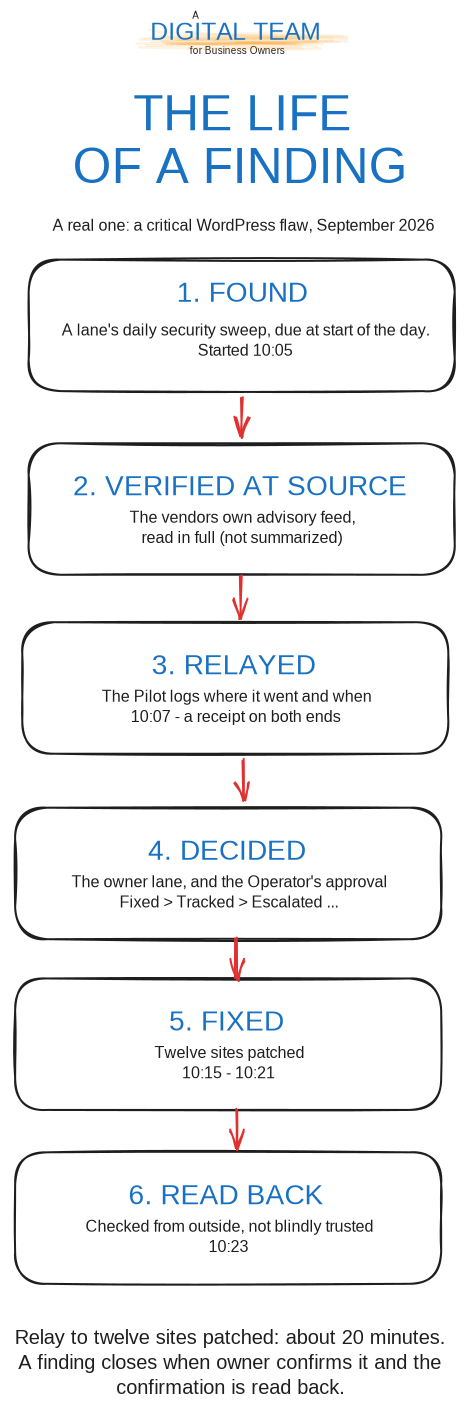
A finding is found in a lane’s daily security sweep, verified at the vendor’s own source, relayed through the Pilot with a receipt on both ends, decided by its owner and the Operator, fixed, and then read back from outside. It is not closed when it is passed on. A real one, from September 2026: a critical WordPress flaw, relayed through the Pilot, was patched on all affected sites within about 20 minutes.
What the Guard sees
As of 25 September 2026, over 19 days: the Guard read 42,590 commands from the sessions, passed 95.9% of them without a word, asked the operator 2.7 times per hundred, and refused 405. A Guard that asks too often gets switched off, so this is the number worth watching. In any case, our deepshell Guard is a smart one.
Two lessons hold whatever Guard you use. Know which layer refused before fixing anything: a harness, a Guard and an execution wrapper can each stop the same command. And keep one gate – two gates that both ask train the operator to approve without reading.
Lessons from real life
The Team keeps a long appendix of lessons, each one written down with the moment it changed what a session actually did. They are written for the sessions, in their own dry vocabulary. Rewritten for people, and without the who and where, these are the ones I would want to know on the first day. Most of them hold whether you run one AI session or ten.
A confident answer is not a checked one. Sessions report to each other, and to you, in the same confident tone whether they checked or not. The recurring failure was almost never a bad tool, it was the cheapest check skipped because the claim came from a trusted colleague. The cost: a wrong finding travels through the whole Team before anyone looks. The habit: before you trust the check that says you are right, run the one that would fail if you were wrong. A known good case and a known bad case, and they must give different answers.
“Not found” says where you looked. An access refusal is not “it doesn’t exist”, and an index that doesn’t have something says nothing about the thing itself. The cost is false findings, and the worst kind: a session ready to call a perfectly real reference made up. The habit: a negative answer names the place it was read from, and a reference carries where it lives. A commit hash without its repository is a false alarm waiting to happen.
The setting is a request, the running thing is the fact. A config file or a control panel will happily show the version you asked for, next to the live state, with nothing to tell them apart. The tracker does it too: an issue marked fixed does not update the inventory file that still lists the old version. The cost is decisions made, for weeks, about a version nobody runs. The habit: read back from the thing itself, and when a fix changes a version, search your records for the old one in the same change.
Half a list looks exactly like a whole one. A command that shows only the first page, or a pipe that keeps only the last lines, gives an answer that looks complete, and “nothing changed” ends up true for half the evidence. Feeds don’t always promise their order, either. The cost: a sweep that quietly misses the newest items. The habit: every read says how many items it saw and which field it sorted on, and a short count means read it again, in full.
A check that cannot fail is decoration. A guard covered by a test is not a guard proven by breaking it on purpose, and “all of them proven” can turn out to be all but one. The cost is confidence where there is no protection. The habit: count the guards you broke deliberately and saw go red, not the tests that pass.
Don’t invent a gate. A session once wrote “waiting for the Operator’s go” in a status where no rule asked for it, and the work sat for days while everyone, the Pilot included, repeated the sentence. It looked like discipline. The habit: a status says what is due, never a permission the rules don’t require.
Install whole files, never patches. A shared script updated by hand-applied changes drifted from the original until one Department was several versions behind, without knowing. Two Departments running “the same” tool that isn’t. The habit: install the whole file from a named commit and compare its checksum. That is now in the setup guide, step 2.10.
Searching your own history finds your own memory. When a session searches its past conversations to confirm something, most hits are its own notes being loaded back, not the moment it happened. What looks like many confirmations can be one source and its echoes, and the quote may have changed on the way. The habit: look only at what the person actually said, and only before the note about it existed.
Dry, but a real effective guidance for the Sessions.
Where to start
Do not start with a full Team. Start with Departments (or Lanes, or Sessions). When at least 2-3 Departments have some real work history, implement my blueprint as instructed.
Reason for that is that the lanes (“colleagues”) have to have some work memory in their assigned Departments.
You wouldn’t want to run your Company only with inexperienced interns, right?
But don’t worry: virtual colleagues work at 100x speed, so a week of daily work in each lane is probably years in human time.
You need to run Claude Code and a folder in git for each Department of your business. Keep them together in ~/Company/, i.e. ~/Company/marketing, ~/Company/sales, the place your business’s real work lives. On a system that already has a work folder (for example Omarchy’s ~/Work), that works too; the name is yours.
You never used Linux, a terminal or git? The setup guide’s Stage 0 walks you through installing Ubuntu, the tools and Claude Code, one command at a time.
Everything below is typed in a terminal (on Ubuntu: Ctrl+Alt+T).
Type or paste one command, press Enter, then go to the next one.
Go to your home folder:
cd ~Download the Digital Team:
git clone https://github.com/bsusala/digital-team.gitMake the folder where Claude Code looks for commands:
mkdir -p ~/.claude/commandsCopy the Digital Team commands into it:
cp digital-team/commands/*.md ~/.claude/commands/Make your first Department’s folder, for example for marketing, or whatever project you see fit:
mkdir -p ~/Company/marketingGo into it:
cd ~/Company/marketingTurn it into a git folder, so every change is kept:
git initStart Claude Code:
claudeYou are now inside Claude Code. Commands that start with / are typed here, in Claude, not in the terminal.
Then, in that Department’s folder, run /bootstrap once. It creates the missing Issue tracker files, proposes a working agreement for CLAUDE.md and explains each one; it never overwrites anything.
From then on:
(a) when you open a session, first thing type /resume
(b) before you close a session: type /handover
(c) /housekeeping once a week.
(d) /capture after a task worth repeating.
The first /resume understandably finds nothing – so run /handover at the end of the first session and tomorrow’s has something to read.
When one session works well, the setup guide takes you further in stages: several Lanes, a Pilot, the Charter, the hooks, a Guard underneath, and how each Lane carries its own work to the backup and installs an update to a shared team script.
Already running the earlier charter? The migration guide moves a Team to v3 lane by lane. Releases after that are in the changelog, each with what changed and how to get it.
You do not have to remember when to assemble your Team: /bootstrap now offers to remind you, and when the time comes, Claude walks you through the next stage one step at a time, each on your yes. Otherwise, you can run it whenever you want.
FAQ
Would my Digital Team steal my company and kill me?
No. It has no signature, no bank account and no ambition beyond its Issue tracker. It cannot approve anything, not even for another Department, and a Guard reads every command it runs and follows fixed rules that no argument changes. The most violent thing on record is the Guard refusing 405 commands in 19 days. The realistic risk is duller: that you stop reading its asks. Read them.
What does it cost?
A Claude plan. For a business, that is the Team plan, the one Anthropic made for companies (claude.com/pricing). Ours is around 90 EUR a month plus 21% VAT: 109 EUR. For comparison, in Romania the most junior programmer or DevOps engineer takes home about 1,500 EUR a month net, which costs the company roughly 1.8 times that once taxes are paid: about 2,700 EUR. In our experience the setup covers the work of three to five multidisciplinary IT colleagues:
| Composition | Per month | Per year |
|---|---|---|
| 3 junior colleagues | 8,100 EUR | 97,200 EUR |
| 5 junior colleagues | 13,500 EUR | 162,000 EUR |
| the Digital Team | 109 EUR | 1,308 EUR |
What it does not replace is the Human Operator.
That person’s time is the real cost, and the very reason the Digital Team works. Important note: don’t dream of the stories you may read with clickbait titles: meaningful autonomous AI work is not yet there. You MUST operate the Digital Team. Don’t dream naively. Own your Digital Team.
Do I need to be a programmer?
No, but you need to know your business well enough to judge a recommendation. The minimum mandatory role you have to act on is Product Owner, and adding Product Manager flavours is a clear advantage. The terminal can be learned; the setup guide’s Stage 0 starts from a blank computer.
Can it do something I did not approve?
Inside its own Department, yes: that is the delegation, and it is what saves your time. Anything that cannot be undone, or that leaves the Department, waits for your approval or decision, which you give in writing in that Department’s own session.
What if it makes a mistake?
It will, sometimes, but it does not hide it, like humans do very often. So, a lane makes mistakes confidently. That is why findings are checked at the vendor’s own source, fixes are read back from outside, and everything is in git. Most often, the mistake is promptly discovered during the task (this is Claude Code’s magic) or before finishing the work, and is repaired on the go. While repairing, you will often notice bug discoveries, again on the go. Lanes repairing themselves on the go is stunning. Most of this behaviour is because the Team Rules Charter exists.
Do I have to write procedures for the Department?
No. Do the task once with the session, the way you always do it, then type /capture. The conversation is the specification: you review a procedure instead of writing one. More.
What happens to my data?
The sessions work through Claude, under the terms of your Claude plan. However, the Guard masks the secrets it recognises in command output before the model reads it, and the Team’s Rules require every install from a public registry to be checked first. Safety first.
Am I locked in?
Mostly no. The Rules, the handovers, the trackers and the history are plain text files in git. They stay readable, and useful, without the Team.
Where do I begin?
With one Department and one session, for a week. See Where to start.
How we got here
The posts in this series, newest first:
Part 6: Do it once, then capture
Part 5: The Salt Block
Part 4: The Multiplier
Part 3: Why is that fence there?
Part 2: Don’t Do Anything You Can’t Undo
Part 1: Want a Digital Team?