

Claude vs Claude Code: stop chatting, start working
For months I talked to my colleagues about Claude Code, and for months they nodded. Then we spent two weeks setting up our Digital Team, I watched them work, and understood that every single one of them had heard “Claude”.
Not “Claude Code”. Claude, the chat.
The chat on the phone, the one that writes a nice email and forgets you the moment you close the tab.
Nobody’s fault. The names do not help: “Claude”, “Claude Desktop”, “Claude Code”, “the Code tab”. It sounds like one product with a few skins.
But the reality is very different. It is one Claude model with very different desks, and the desk is the whole story.
When it all started
For most people, AI is a chat. You open a web page or an app on your phone, type a question, and get an answer. That is the whole picture, and for most people it is the only one they will ever need.
A few numbers show how small the rest of the picture is (estimations – nobody counts this precisely, and nobody can).
About 2.4 billion people used a generative AI app this spring. That sounds huge until you notice what it means: roughly 60% have still never used one. Of those who do, the great majority use the free version. ChatGPT, the biggest, had about 900 million weekly users and some 50 million paying subscribers in February 2026, so about 6% pays. And most of what people ask has nothing to do with professional work. By OpenAI’s own count, only about a quarter of ChatGPT messages were work-related in mid-2025. The rest is recipes, health questions, homework, a birthday message.
Andrej Karpathy, one of the founders of OpenAI, sketched the same picture this autumn: about six billion people have barely touched AI, one to two billion use free chatbots, and only around twenty million hand real work to agents. That is roughly one AI user in a hundred.
Funny enough, that tells a lot about the recent doomerism: people using AI are just enjoying it, the rest is in a cognitive limbo.
The special 1% don’t chat with the AI in the usual sense. They hand it work, through something called a harness. Spoiler: Claude Code is a harness.
So what is a harness? It is not the model, the “brain”. It is everything built around the brain so that it can do a job.
Part of it is text you never see. Before your first word reaches the model, the app sends a long set of instructions of its own: how to behave, what tools it has, how to talk to you, what never to do. This is called the system prompt. Every AI app has one, the chat included, and the same brain with a different system prompt behaves like a different specialist. That is how one model becomes a video maker, a lawyer’s assistant or a language tutor.
By early 2024 people had already built more than three million custom versions of ChatGPT, most of them little more than a system prompt with a name. Today ChatGPT’s app directory holds thousands of apps, or close to twenty thousand by one independent count.
Curious what a system prompt looks like? Anthropic publishes the ones behind its Claude apps on its system prompts page. Claude Code’s is not published officially, but the community keeps a version-by-version copy at claude-code-system-prompts. For a friendly tour of what’s inside, see Simon Willison’s walkthrough.
A harness goes one step further than instructions: it gives the brain hands.
It can open the files on your computer, write new ones, run programs, check the result and keep going until the task is done, asking you first wherever its rules say it must. A chat only tells you how to do something. A harness does it.
Now, the story of Claude Code.
It started inside Anthropic in late 2024, as an experiment by an engineer named Boris Cherny: what if Claude could use the terminal, the plain text window where programmers type commands? Soon, his colleagues picked it up, then most of the company. (He tells the story himself, better than I can, in
this conversation, or in this one, and writes on his own blog.)
Anthropic released it to the public as a “research preview” in February 2025, and for general use in May 2025, together with the Claude 4 models. It was not an instant hit. Then it suddenly was. By November 2025 it was earning at a pace of a billion dollars a year, by February 2026 two and a half billion, and in a developer survey this summer about four professional programmers in ten said they use it at work.
There is a catch in that story, and it explains most of the confusion I met. Claude Code was born in the terminal: a black window with white text and a blinking cursor, no buttons, no icons. It ran on Linux and on the Mac, the computers programmers live on. Windows users had to install a small Linux inside Windows first, which is exactly as inviting as it sounds.
Then it took off, and Anthropic brought it to everyone else. Claude Code learned to run on Windows directly, borrowing a small set of Linux-style tools that come with Git, a free program for keeping track of file versions. And it moved into the Claude Desktop app, the same app people already used for chatting, as a second tab next to Chat. Today anyone with a Windows laptop can use it without ever seeing a black window.
That move is a gift, and it is also where the trouble starts. Same app, same login, same Claude, so people assume it is the same thing. And the new tab is labelled Code, with a little </> icon, which to the normal office worker says “not for you, this is for programmers”. So they stay in Chat, where they feel at home.
I get it. But it is Ali Baba’s cave: a plain rock you would walk past, and behind it, the gold. All it takes is a little courage to say “open sesame” and click the tab.
What puts it in a league of its own? Not the brain: the same Claude models answer in the chat. It is everything around the brain. In business terms:
- It works on your actual files, not on copies you paste into a chat window.
- It does the job, not a description of the job. It runs programs, scripts and tools, and keeps what it built so the job can be done again.
- It follows your house rules every time, because it reads them at the start of every session.
- It asks before anything risky, and you decide what counts as risky.
- It leaves a trail: what changed, when and why, so the work can be checked, handed over, or undone.
- It can stay on a task for a long stretch, step after step, without you feeding it each one.
The same brain, at a different desk
So, open Claude Desktop and you see two tabs, Chat and Code.
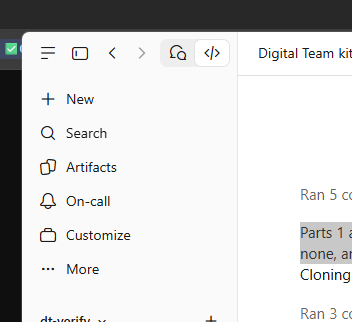
That </>
is the rabbit hole,
the source of your boosted productivity, the right thing to do. Don’t waste time with recipes.
The same models answer in both. The difference is not in how Claude thinks; it is in what it can do: what it can reach, what it reads before you say a word, and what is left behind when you close the window.
In Chat, Claude works inside the conversation. You type, it answers. You attach a file, it reads that file.
Sure, with connectors it can look into your mail or calendar and prepare a draft. But when the conversation ends, what remains is the conversation. Nothing on your computer has changed. Tomorrow’s chat starts knowing only what the app’s memory decided to keep, which is a few facts about you, not the state of your work.
In Code, Claude works inside a folder on your computer. You open a session on a folder (say, your department’s folder) and Claude can read what is in it, write new files, and run commands, asking first when rules say it must. Before your first message it reads a file named CLAUDE.md in that folder: your standing instructions, written once, obeyed every time. And what it does lands in files you own.
That last sentence is the whole difference.
A Chat produces answers.
A Code session produces files: a task list, a note of where the work stands, a record of every change, and a copy somewhere safe. Answers evaporate. For Claude Code, everything that matters is a file: what it reads, what it uses, what it produces. Files stay, and the next session can read them.
“But I’m not a programmer”
Neither are my colleagues. They do quotes, production, sales, client emails. The tab is called “Code” because programmers built it, and programmers are still its heaviest users.
Decades ago, programmers had to solve the problem every office has with a capable helper: how do you hand work over, check what was done, and undo a mistake? Their answer was boring and brilliant: a written instruction file, a task list, a log of every change, a second copy somewhere else, and a rule that nothing is real until it is recorded. None of that is about software.
It is teamwork discipline, and engineers perfected it in a hectic, complicated world.
What an office gets from the Code tab is not programming; it is the programmer’s habits, applied to a quote for a client, to a workflow, to an invoice, to an email.
Three things that surprised my colleagues
The rules are read every time, not remembered. One of our colleagues had written his golden rules (never send an email on his behalf, never reveal a supplier to a client, the invoicing tool is read-only) in a personal settings file. When we moved his work into the company folder, the rules moved into a document in the department, with a line in CLAUDE.md saying “read this before quoting”. Reasonable, right? Wrong. A pointer is read when Claude decides it needs it. An import, one line starting with @, is read at the start of every session, no decision involved. So we swapped the pointer for an import, opened a fresh session on a client folder, asked “what are your rules about sending emails?”, and got the rules back, word for word. That is the difference between a colleague who once heard the rule and one who has it pinned above the desk.
Claude Code drives real programs. Another colleague does signage and point-of-sale design. All of the sudden, I found out with surprise that his Claude was building a 3D model of a totem and filling an invoice draft that waits for his yes before anything is saved.
In Chat you would get instructions for doing that.
In Code you get it done, in a file, with the script kept so it can be done again.
Its memory is not where you think it is. This one deserves its own section.
What does Claude Code actually remember?
One colleague asked me the best question of the whole rollout: “every session is saved anyway, so why do I need a handover? Couldn’t Claude just search the old conversations?”
We are talking here about the actual
/handovercommand from our Digital Team Kit.
Here is what lives where:
CLAUDE.md, the rules. Read at the start of every session, always.- Memory, small facts. A short file of things Claude learned (“the client prefers PDF proofs”), also read at the start.
- The handover, where the work stands. What is done, what is in progress, what is next, and why. Read when you open the next session and ask for it.
- The transcripts, everything. Every word, every command, every dead end. Read never, unless you ask.
Could Claude search the transcripts? Technically, yes: they are files on your disk. Practically, they are the raw tape of a meeting, not the minutes. They hold the wrong guesses as faithfully as the right answers, the decision you reversed at four o’clock reads exactly like the one you kept, and they run to megabytes. A search finds words; it does not find the current state, or their meaning. The handover is the minutes: written at the end by the one session that knows what mattered, short, and saved where it is backed up.
The handover is a door
Our account manager is the most disciplined person in the office, which is why his mistake is worth telling. He ran the /handover command often, in the middle of his work, and kept going. In his head it was a “memory snapshot”: save the state, carry on, safer that way.
But a handover written at eleven describes the work at eleven. Everything after it lives only in the raw tape. And he almost never ran the command that reads a handover at the start of the next session, so each new day began either blank or by reopening an old conversation from the app’s list, which drags the whole tape back in, noise included.
So here is the rule, in one line: the handover closes a session; the takeover opens the next one. One session hands over, the next takes over. Not a camera you click while working, but a door you walk through at the end of the day and the beginning of the next.
About “takeover”: the command used to be called
/resumein our Digital Team setup. On Windows, in the Desktop app, typing/resumeopens the app’s own list of past sessions, so our command never even ran there. Nobody noticed for days, because a list of past sessions looks very much like “resuming”. We renamed ours/takeover) More about our setup and where it stands: Digital Team.
So which one, when?
Use Chat for a quick question, a translation, thinking out loud before you know what you want, anything you
will not need again.
Use Code for serious work, the work of your business: anything you will want to find, continue or check next week, and anything that must follow your rules. A decision you reach in Chat is not in your work until you bring it in Code: paste it into the Code session and ask Claude to record it.
The test is simple. If closing the window would lose something you care about, you are at the wrong desk.
The gap is bigger than it looks
I expected to teach my colleagues a tool. I ended up explaining a difference in kind: between a very smart person you talk to, and a very smart colleague who sits at a desk in your office, reads the rules on the wall every morning, keeps a log, and leaves a note for tomorrow.
Both are Claude. Only one of them is still working on Monday.
One last story. For months I pitched Claude Code to my colleagues with the same line: “it’s so powerful, it can
do anything.” An exaggeration at the time, and I knew it.
One of them took it literally. When we finally got the company accounts, he asked Claude to drive a leading graphics program for him. I would never have thought to try this. Now he builds editable graphic files and projects from Claude Code as routine, and actually from the very terminal, not from Claude Desktop. Which is amazing in itself, he being a man who spent his whole working life clicking buttons in graphics programs. Weird and crazy.
When I asked how on earth he came up with that, he shrugged: “But you said it can do anything, right?”
Bogdan Susala, November 2026

Leave a Reply